Examples · real renders · before and after

Bicep heart AI examples: what one photo turns into

These are real bicep heart videos rendered by Bicep Heart AI from a single photo, not mock-ups. Each one lists the input, the settings, how long it took, and what worked or did not. Both inputs are AI-generated fictional adults, so no real person's photo is shown. Your result will differ with your photo.

Updated

By the Bicep Heart AI editorial team · How we write and check this page

01 · Start with your photo

Add one waist-up photo of you

0/1

One clear photo of one adult is all it needs: face visible, both arms and hands in the frame. You do not need to be flexing in it. Accepted: JPG, PNG, WebP · max 10 MB · min 300 × 300 px.

  • Waist-up, facing the camera
  • Both arms and hands in frame
  • Just one person
  • Short sleeves or bare arms
02 · Pick a resolution
Resolution
Sound

6 credits · about 7 s · 9:16 MP4 · original sound · Compare packs

The number on the button is the full cost of this render. There is no free preview, and a failed render returns its credits.

Real renders

Two test renders, flaws included

Made on Nov 8, 2026 at 480p through the same pipeline the site uses. We picked two different builds and outfits to see how well the tool keeps each person's look.

Make my bicep heart video
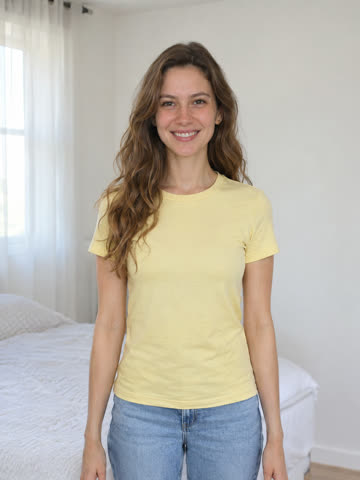
Test 2 · 480pThe single photo used for this render: a woman in a yellow tee

Slim build, yellow tee

A fictional woman with long wavy hair in a pastel-yellow tee. The photo she was made from is in the corner.

  • Kept: face, hair, earrings and the yellow tee
  • The heart reads clearly at phone size
  • Moves match the trend's timing closely
  • Flaw: her slim arm turns muscular during the flex
  • Flaw: the short sleeve becomes sleeveless as she grips it
  • Render time: about 5 minutes
Test 1 · 480p

Average build, striped polo

A fictional man of average build in a navy and grey striped polo, in a bright room.

  • Kept: his face throughout and his own striped polo
  • The sleeve rolls up cleanly and the fingers look natural
  • Flaw: the flexed arm grows clearly more muscular than his build
  • Flaw: the motion runs a fraction of a second ahead of the original
  • Render time: about 10 minutes

AI-generated videos of fictional adults. Fingers, arms and timing can drift from the source photo, and every clip uses the same indoor setting.

What's new on this page

  • Published the first two test renders with their inputs, timings and the flaws we found.

What we check in every render

CheckTest 1Test 2
Face matches the photoYesYes
Own clothes keptYesYes, sleeve changed
Heart visible at phone sizeYesYes
Fingers naturalYesYes
Arm size matches the photoNo, more muscularNo, more muscular
No added text or watermarkYesYes
Length and shapeAbout 7 s, 9:16About 7 s, 9:16

What the video does, beat by beat

Every render follows the trend's timing. For about the first second and a half you hold your forearms forward and smile. Your hands swing in and one grips the other upper arm, then the sleeve is pushed up. Around the three-second mark the arm flexes with the fist beside the head, the fingers curl over the bicep with the thumb down, and the heart holds for the last three seconds with a head tilt and a smile.

Every clip uses the same simple indoor setting and handheld camera feel, so your photo's background is not kept. Your look, hair and outfit come from your photo.

What these tests tell you before you pay

Likeness and the heart itself held up in both tests. The weak point is arm size: the AI tends to exaggerate the flex, so slim or average arms come out bigger. If you want your arms to look exactly as they are, film the pose yourself.

Sleeves can change as they are pushed up. Short sleeves rolled cleanly in one test and turned sleeveless in the other. A tank top or a fitted tee gives the most predictable result.

How these were made

Both clips came from one photo each at 480p, the 6-credit setting, through the same pipeline and video model the site uses for paying users. Neither was retried or edited. The sound on test 2 is the trend clip's original sound, which the site adds by default. We will add renders from real users only with their written permission.

06 · FAQ

Common questions on this page

Yes. Both clips were rendered by Bicep Heart AI from one photo each, on Nov 8, 2026, at 480p, without retries or edits. The input photos show AI-generated fictional adults, not real people.

They may. In both tests the flexed arm came out more muscular than in the photo, because the AI tends to exaggerate the flex. Likeness and outfit held up better than arm size.

No. Every clip uses the same simple indoor setting, so your photo's background is not kept. Your look, hair and outfit come from your photo.

Our two test renders took about 5 and 10 minutes from upload to finished video. Wait times depend on the provider's queue.

Try the bicep heart with your own photo

Upload one waist-up photo and the generator animates the flex and the heart, ready for vertical feeds. The price is on the button before you render.